




Running a medical clinic or healthcare center involves more than just seeing patients. Behind the scenes, there are appointments to schedule, records to store, bills to manage, and reports to track. Managing all this by hand takes time and can lead to mistakes.
That’s where medical software management systems come in. These tools help clinics organize everything in one place from patient data and billing to reports and communication.
But with so many software options out there, how do you know which one is right for your clinic? Let’s look at five key features that every good medical software management system should have.
1. Easy-to-Use Interface
A good medical software system should be simple to use. Doctors, nurses, and office staff don’t have time to learn a complicated program.

An easy-to-use interface means:
- Clear menus and buttons
- Simple navigation
- Quick access to key tools like scheduling and billing
- Little to no need for long training sessions
When staff can easily find what they need, they spend less time clicking and more time caring for patients.
For example, if a nurse can check a patient’s history or schedule a follow-up visit in just a few clicks, it saves valuable time. A simple design also reduces errors no one wants to enter data in the wrong place or delete a record by mistake.
2. Secure Patient Data Management
Every clinic handles sensitive patient information. Keeping that data safe should be one of your biggest priorities.
A reliable medical software management system must have strong security features to protect patient records. Look for:
- Encrypted data storage (so information stays private)
- Secure login and password protection
- Role-based access control (only certain people can view certain data)
- Automatic backups to prevent data loss
- Compliance with laws like HIPAA
Security is more than just following rules it’s about trust. Patients share personal details with you. They expect that their data will not be leaked or misused. A system with strong data protection helps maintain that trust and prevents costly breaches.

3. Integration with Other Systems
Many clinics already use other digital tools like billing software, lab systems, or EHRs (Electronic Health Records). If your new system doesn’t connect with them, it can cause extra work and confusion.
Integration means your software can share information with other platforms smoothly. For example:
- When a doctor orders a lab test, the results appear directly in the patient’s record.
- Billing information moves automatically from the consultation notes to the invoice.
- Insurance data updates in real time.
Without integration, your staff might need to enter the same data in multiple systems, which wastes time and increases the risk of errors. A good medical software system keeps everything connected and up-to-date.
4. Reporting and Analytics Tools
Good decisions in healthcare are based on good data. A strong medical software system should help you see what’s working and what’s not.
Reporting and analytics tools turn raw data into clear, simple insights. They can show:
- How many patients visited this month
- Which services bring in the most revenue
- How long it takes to get claims approved
- How often appointments are missed or rescheduled
With this information, you can find areas to improve like reducing missed appointments or speeding up billing.
Dashboards with graphs and charts also make data easy to understand, even for non-technical staff. You don’t need to be an analyst to spot a problem when you can see it visually.
Analytics also help with financial planning. You can track income, expenses, and patient flow to make smarter business choices.
5. Cloud-Based Access and Mobility
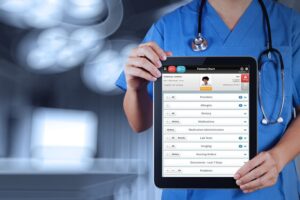
In today’s world, people expect flexibility and that includes healthcare providers. A cloud-based medical software system lets you access your clinic’s data from anywhere, not just the office.
That means doctors can check records from home, or staff can manage appointments even when working remotely.
Cloud-based systems also bring other benefits:
- Automatic software updates
- No need for expensive servers or IT setups
- Secure online storage
- Scalable easy to add more users or data as your clinic grows
If your software is cloud-based, your data stays safe even if your computer crashes or your clinic faces a power outage. The system stores everything securely on remote servers, always ready when you need it.
Bonus Feature: Reliable Support and Training
Even the best software can have issues sometimes. That’s why good customer support matters.
Choose a provider that offers:
- Quick help through phone, chat, or email
- Step-by-step training for your staff
- Regular updates to fix bugs and improve performance
A support team that listens and responds fast can save your clinic hours of downtime. It also gives you peace of mind knowing you’re never alone if a problem arises.
How to Choose the Right System

Picking the right medical software system depends on your clinic’s size, needs, and goals. Here are a few steps to help you decide:
- List your needs. Do you need billing, scheduling, patient records, or all three?
- Check for compliance. Make sure it follows healthcare privacy rules.
- Ask for a demo. See how it works before you buy.
- Read reviews. Look for feedback from other clinics like yours.
- Compare pricing. Choose a plan that fits your budget but doesn’t skip important features.
The right system should make your daily work easier not harder.
Key Takeaways
Let’s recap the five key features you should always look for in a medical software management system:
- Easy-to-use interface — Saves time and reduces mistakes.
- Secure patient data management — Keeps private information safe.
- Integration with other systems — Connects all your clinic tools.
- Reporting and analytics tools — Helps make smarter decisions.
- Cloud-based access — Offers flexibility and data protection.
When these features come together, your clinic runs smoother, your staff works better, and your patients get better service.
Final Thoughts
Medical software management systems are not just tools they’re the backbone of modern healthcare operations. They help clinics stay organized, secure, and efficient.
By choosing the right software, you save time, reduce stress, and focus on what truly matters: caring for your patients.
Start by understanding your needs, review your options carefully, and pick a system that grows with your clinic. A good software system is an investment that keeps paying back in time, trust, and better care.